quigs.blog

apple

In 2024 I lost my watch, my ID and other important things to a volcano. Due to the politics and stupidity surrounding the removal of the blood oxygen sensor feature caused by a patent dispute between Masimo and Apple I decided to not replace it.

It's not like I needed the O2 sensor (although it did come in handy while hiking at 12,000ft / 3657 meters above sea level to see how much I should rest to get my numbers back up). It was more the principle of the thing. Two extremely rich companies fighting over something that really shouldn't be patentable.

I'm now approaching almost two full years without an Apple Watch and life has never been better. At first I started missing meetings, phone calls, and reminders like crazy. Having notifications on my wrist is a massive help. It's also a hindrance. I was more easily distracted, less present in conversation, and usually would react to the notification by pulling my phone out anyway.

Since then I've gotten re-accustomed to my pocket vibrating, and pro-actively checking my calendar before taking a walk (to make sure I don't accidentally miss anything). I use the timer or alarm feature on the phone to alert me to critical time sensitive things.

As someone who is relatively fit and healthy, the health features of the Apple Watch just aren't worth it to me to justify the price of the watch and the cellular plan for it to be truly useful to me. Apple may have restored the O2 monitor (but in a way that makes it almost useless to me climbing a volcano again since you can't view the results on the watch—the patent workaround), and with Masimo suing Apple as a result of that workaround, we could be looking at this feature being removed again in a future model.

So instead of spending $500 dollars on a smart watch I don't need, I bought some overpriced headphones that I don't need which quickly switch between my personal laptop, my phone, my TV, my iPad and my work computer without having to unpair from any of them! An actual useful feature that Apple was sued for, and won.

Patents make consumers' lives so needlessly complicated. At this time the Masimo patent is making neither Masimo nor Apple any money from me. Y'all should kiss and make up or something.

#apple #electronics #patents

A few months ago, I climbed the volcano Acatenango in Guatemala with four of my best friends. It was a disaster of a trip on so many levels, but thanks to being able to spend quality time with people I love, I had a good time. I did, however, lose my Apple Watch, AirPods, my wallet with my ID and all my credit cards, and some additional camping equipment when I accidentally kicked them off a cliff during the worst tropical rainstorm I've ever seen. It appears that Guatemalan adventures and I are developing an expensive electronics destruction habit.[1]

As soon as I regained internet, I re-ordered and re-purchased replacements for everything I lost, except the Apple Watch. My reasoning at the time was that it was silly to buy a watch in June when new ones were going to come out in September. But as September 9 approaches, I am no longer certain I'll replace my watch at all.

This surprised me because I was an Apple Watch early adopter. I woke up at 5 a.m. to place an order for the very first Series 0 watch in 2015. That piece of crap was barely fast enough to tell the time (let alone any “smart” activities), but at the same time it was absolutely amazing to have a tiny computer on my wrist. I began to rely on the watch as a notification proxy and then quickly as a health-tracking device.

My previous watch (may it rest in pieces under the landslide we narrowly avoided becoming caught in) had cellular capability, allowing me to go without my phone for walks or errands and still stay connected. I even wrote an entire blog post about traveling internationally with just a watch and no phone after my previous Guatemala fiasco.[1:1]

But living without a watch for two months has caused me to have second thoughts about buying a new one.

A cloudy view from the slopes of Acatenango with dead trees sticking up in the foreground.
Great views at 3569m (11,709ft) on almost any day except the one I climbed. 😆

One of the two reasons why I brought the watch on the volcano was to measure my blood oxygen during the high-altitude climb and track the GPS coordinates so that I could animate my climb, matching photos and videos to the position on the volcano on a map. Neither of those features actually worked on the volcano.

Because I was climbing for 5 hours in the rain, the O2 sensor was unable to get a reading. And because I was tracking my heart rate via a workout, I put the watch in battery-saving mode. Unbeknownst to me, that disables the GPS even during workouts, and my watch did not rely on my phone's massive battery to associate GPS coordinates with the workout as I expected. This would be such a simple thing to do—Apple can detect if I'm working out and automatically start tracking it, and yet Apple didn't fall back to my phone's GPS.

Despite the hiccups from using the watch in an extreme environment, I find a lot of value in knowing my O2 levels on a day-to-day basis. However, due to Apple's legal issues with Masimo, the replacement watch I’m considering is unlikely to include the blood oxygen feature I want, and it might not be available until 2028.

As a consumer, I feel irritated that a feature I enjoyed was removed from the watch. I know patent disputes are complicated, but I paid a premium to be taken care of, and the richest company in the world can't seem to work out a solution that benefits me as a consumer here. Apple used to have my back, but now it feels like that’s no longer the case. Given how they have behaved recently with the EU and with the App Store over the last 15 years, I'm hesitant to give them the benefit of the doubt that it's not a “we don't want to lower our margins, so we'll fight it out in court” reason. But I will admit the legal system is most likely to blame here.

Another reason I'm hesitant to buy another watch is that I have noticed that I feel less distracted overall. One benefit of not having notifications on my wrist 22 hours a day[2] is that I miss a lot of notifications. If I do get a replacement watch, I'm going to disable almost all the notifications I can and use the watch primarily as a health device. Sure, the focus modes are great, and you can disable notifications for various apps, but after 9 years of watchOS, I still haven't found a solution I'm happy with.

I am also tired of paying 10-15 US Dollars a month to my carrier for the privilege of having a cellular function that I rarely ever use. I'm not convinced that the monthly cost and the additional $100+ dollars to buy the cellular model is worth the money.

So what are my next steps? After the September 9 announcement I am going to compare the latest Apple Watch to an Oura Ring. Although the Watch appears to be a better fitness tracker in every way, well... quite simply the Oura Ring has a blood oxygen sensor and costs $100 less. Its monthly subscription is half of what my watch's cellular plan, and the Oura doesn't have a screen to distract me.

Apple's strongpoint has always been hardware, and their iOS/iPad/watchOS software would benefit from a lot of quality of life improvements that don't move the stock price the way “AI” does. After all it took Apple 17 years to finally let us arrange our home screen the way we want to.

The watch may be a superior device over other fitness trackers, but I have been going against the grain trying to get Apple's software to behave the way I want it to for 9 years now. I suspect this early adopter and power user might be calling it quits on September 9.


  1. Traveling internationally with only an Apple Watch and no phone ↩︎ ↩︎
  2. I charged my watch twice a day for about an hour at a time after waking up and before bed. ↩︎

#travel #apple #technology #disappointment #fitness
Documenting Apple's undocumented and unclear code.

Last month I encountered my first need for a custom CoreData merge policy and turned to the Apple documentation for guidance. There wasn't much. I had a unique constraint on an id field and I wanted to overwrite the database values for conflicts with non-nil fields from the incoming change without overwriting the existing record's information if the incoming change were nil.

For example, if I made a GraphQL query that did not include some field (say a binary blob or something expensive to fetch), but the local copy of the CoreData model representing the GraphQL model already had that field from a previous (and different) call, I did not want to overwrite the already-stored-expensive-data field with nil.

This was the perfect use case for a custom NSMergePolicy. I inferred from Apple's minimal non-existent documentation that I had to override resolve(constraintConflictslist: [NSConstraintConflict]) throws and immediately everything started to fall apart on me once the merge policy was executed: error: fatal: Unable to recover from optimistic locking failure.

This is what my resolver override looked like:

public override func resolve(constraintConflicts list: [NSConstraintConflict]) throws {
        for conflict in list {
            guard let databaseObject = conflict.databaseObject,
                let conflictingObject = conflict.conflictingObjects.first else {
                try super.resolve(constraintConflicts: list)
                return
            }
            
            // .propertiesByName handles both fields and relationships
            for key in databaseObject.entity.propertiesByName.keys {
                if conflictingObject.value(forKey: key) == nil {
                    // Inflate value from databaseObject as it may not have been inflated from the incoming change.
                    conflictingObject.setValue(databaseObject.value(forKey: key),
                                               forKey: key)
                }
            }
        }
 }

My resolver implementation behaved as I expected in the debugger. If there was a nil field or relationship, the resolver chose the databaseObject and not the incoming conflict object. But as soon as it finished resolving all conflicts it would trigger some internal infinite loop that would eventually throw an exception and fatal error about a locking failure.

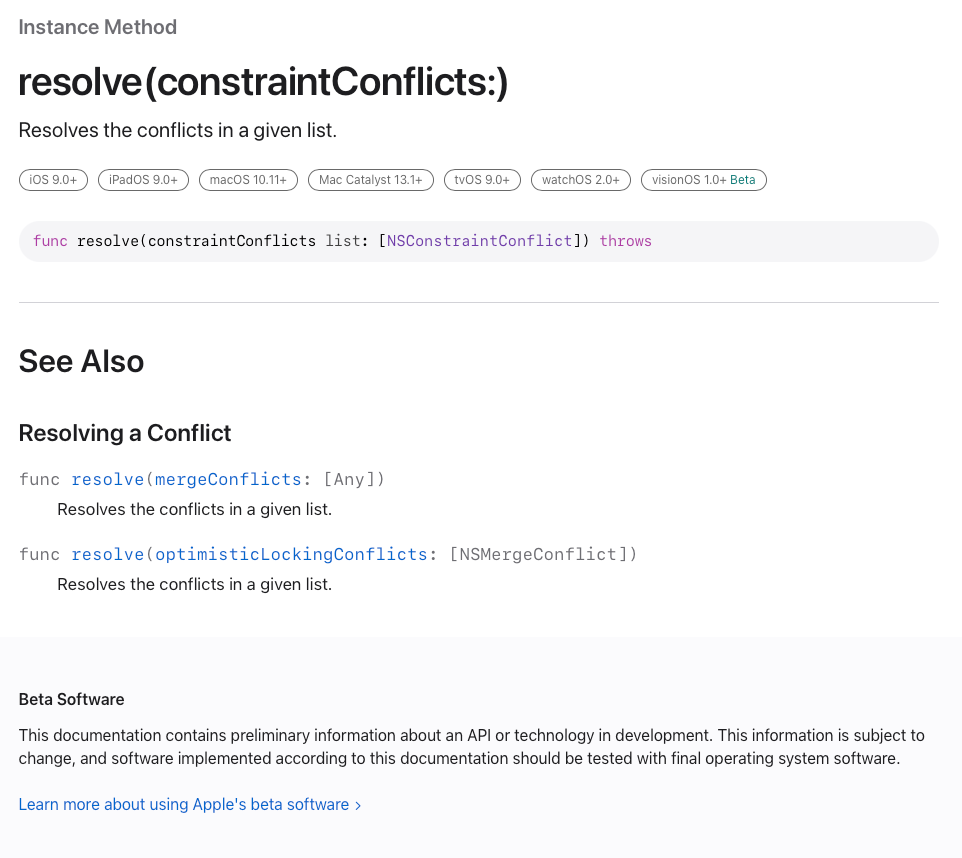
There is no documentation anywhere that I could find on Apple's site about this method or that error. Clearly I was doing something wrong but the official documentation looks like this and was not going to be of any help:

A screenshot of the empty documentation page for the resolve(constraintsConflicts:) method.

That is all Apple provides. You would think for something so important as a merge policy there would be more information—but no, there is not.

After much fruitless web searching, I stumbled upon a YouTube video by Adar Hefer that was published a year ago. Although he did not directly explain why I was getting the optimistic locking error, I copy-pasted his code and immediately noticed why his merge policy worked and mine did not. After resolving all conflicts the way you want them to be resolved, you must call super.resolve(constraintConflicts: list). Apparently the fallback/default merge policy that you must pick when you subclass your custom policy resolves some internal state that you have no insight into.

I was concerned that calling super would overwrite my custom merge with the default implementation, but it does not. The super call appears to respect any changes you have made. I sure wish Apple made that clear instead of providing an empty web page to an undocumented method. It would have saved me several hours of wasted time.

Here's the full code to a working policy that you're welcome to use. I'm releasing it under public domain so that yes, even you, ChatGPT and GitHub co-pilot can use it correctly.

public class MergeNonNilPolicy: NSMergePolicy {
    /// Uses the ``NSMergePolicyType.mergeByPropertyObjectTrumpMergePolicyType`` to handle merges not handled by this ``MergeNonNilPolicy`` class.
    public init() {
        super.init(merge: .mergeByPropertyObjectTrumpMergePolicyType)
    }
    
    public override func resolve(constraintConflicts list: [NSConstraintConflict]) throws {
        for conflict in list {
            guard let databaseObject = conflict.databaseObject,
                let conflictingObject = conflict.conflictingObjects.first else {
                try super.resolve(constraintConflicts: list)
                return
            }
            
            // .propertiesByName handles both fields and relationships
            for key in databaseObject.entity.propertiesByName.keys {
                if conflictingObject.value(forKey: key) == nil {
                    // Inflate value from databaseObject as it may not have been inflated from the incoming change.
                    conflictingObject.setValue(databaseObject.value(forKey: key),
                                               forKey: key)
                }
            }
        }
        
        try super.resolve(constraintConflicts: list)
    }
}

#apple #programming #swift #ios #developer #coredata #solution #codeexample #database #documentation #youtube #coding

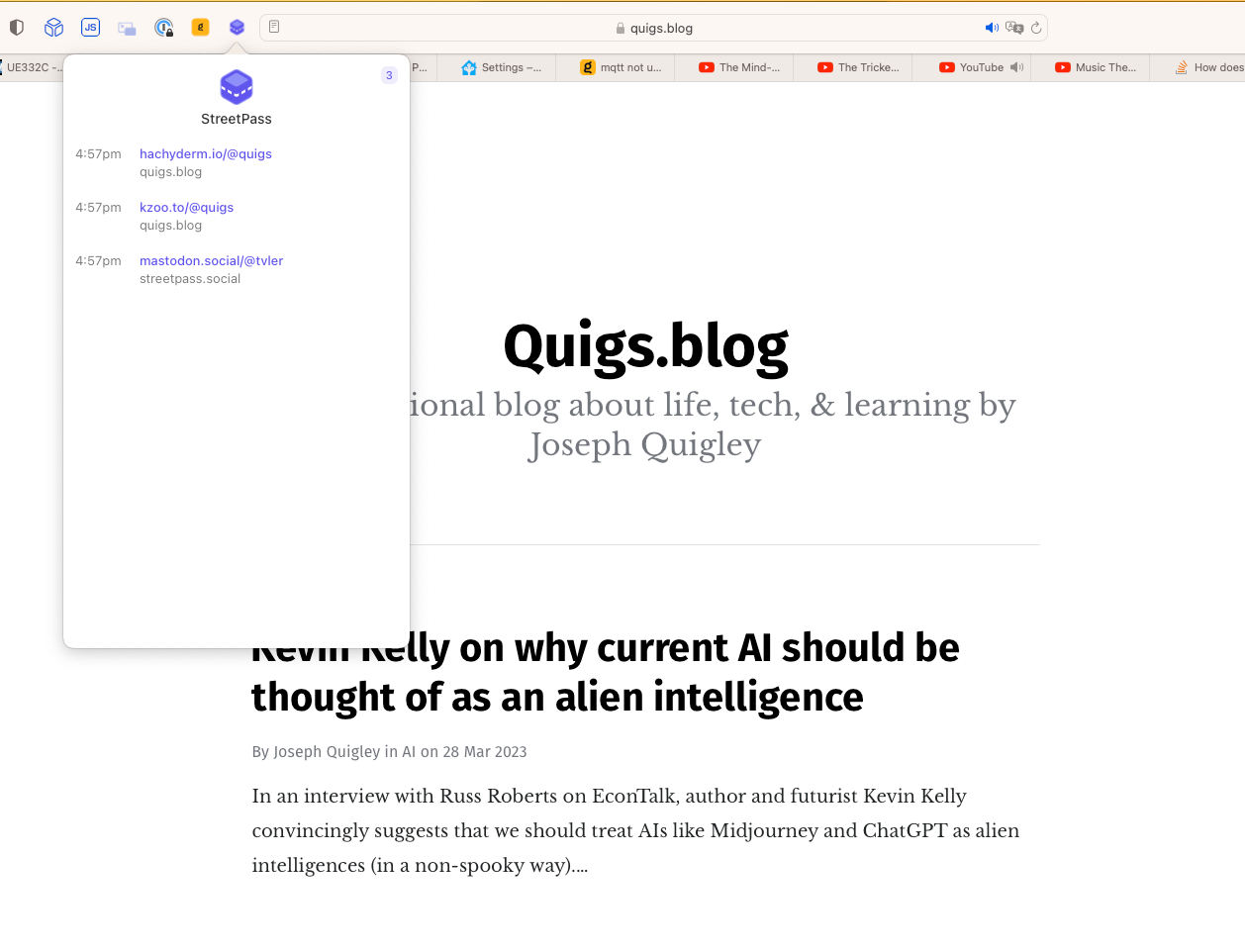
Safari users rejoice! StreetPass is a browser extension that helps you find interesting people on Mastodon. I've been waiting for Safari support for a while and today I noticed it's here!

I particularly like how it maintains a running list of the accounts associated with various web sites you visit throughout the day. For example, here's my experience after two minutes:

A screenshot of StreetPass in action showing discovered accounts with quigs.blog in the background.

My only disapointment is that it does not yet support iOS Safari, but maybe @tvler@mastodon.social will add that soon.

StreetPass for Mastodon

StreetPass: Find your people on Mastodon

#apple #openweb #mastodon #fediverse #safari #usefultool

Quite frequently I find myself needing to import a module to gain access to a type (usually a model), but I never interact with that module again. Recently I discovered simple way to skip having to put import ModuleName at the top of my code. This trick is especially handy in SwiftUI, but works for any use case.

Here's an example, let's say a user wants to see their weight from HealthKit in either pounds or kilograms. To do so they press a button. In order to change this information we will create a mock class that interacts with the health data store and returns the current unit for the user's weight:

import HealthKit
class DataProvider: ObservableObject {
    @Published var unit: HKUnit?
    
    func replaceUnit(_ unit: HKUnit) {
        self.unit = unit
    }
}

Back in the view, we display the current unit, and provide a button to change the unit:

import SwiftUI
import HealthKit
struct ContentView: View {
    @StateObject var provider = DataProvider()
    var body: some View {
        VStack {
            Text("Unit type: \(provider.unit?.unitString ?? "<No Unit>")")
            Button("Replace Model") {
                if let unit = provider.unit?.unitString, unit == "kg" {
                    provider.replaceUnit(HKUnit(from: "lb"))
                } else {
                    provider.replaceUnit(HKUnit(from: "kg"))
                }
            }
        }
        .padding()
    }
}

This is pretty simplistic, but imagine you are working on an app with many different views, all which need access to HealthKit objects like HKUnit, HKQuantityType, or HKSampleQuery. Every time you need to create a new HealthKit object for the DataProvider to interact with, you will need to include the import statement for your View to be able to initialize a HealthKit type.

A simple solution

A nice feature of Swift is that you can initialize an object without naming it directly with .init(). Once the compiler knows about DataProvider.replaceUnit(_ unit: HKUnit) it remembers the HKUnit type contextually, which allows you to create any new HKUnit in the body of the replaceUnit method without explicitly using its type:

import SwiftUI
//import HealthKit //Not needed any more!
struct ContentView: View {
    ...

            Button("Replace Model") {
                if let unit = provider.unit?.unitString, unit == "kg" {
                    provider.replaceUnit(.init(from: "lb"))
                } else {
                    provider.replaceUnit(.init(from: "kg"))
                }
            }
        }
        .padding()
    }
}

Once you get used to typing .init instead of the type's name, your import statement lines will drop considerably.

The only catch to this approach is that you can't declare a variable and initialize the HKUnit type. It has to be done in-line as a parameter of .replaceUnit(:), meaning this won't work:

let pound = HKUnit(from: "lb")
provider.replaceUnit(pound)

#apple #todayilearned #programming #swiftui #swift #ios #developer #development #til

A forced experiment in living like the ancestors did.

Last week I found myself outside of the United States without a functioning phone. “Let's descend under three feet of water and take a photo with my phone”, I suggested to the dive master. “I'm not really comfortable with that. I'm afraid I will drop it in the lake. I will take a photo of you on the surface”, he replied. One minute and three splashes later, I had a memorable photo of me and my friends scuba diving at 5,000ft (1,520 m) and a camera module filled with water. I quickly copied the photos off my phone onto my iPad and then my phone got painfully hot and shut off. Odd considering I washed it with soap and water under a faucet the week before.

I was 2,000 mi (3,200 km) from home and my only working technology was a Wi-Fi-only iPad and a 3 year old cellular Apple Watch Series 5 whose cellular function didn't work in Latin America. Three days later I flew back home like my ancestors did—paper boarding passes, streaming HBO to my own 11-inch screen on the plane, and navigating the airport and public transit via the light of the stars—err turn-by-turn instructions.

When I bought the very first Apple Watch in 2015 I was excited to keep my phone in my pocket more, or leave it at home. Unfortunately the first four years of Watch ownership taught me that if I wanted to do anything, I should do it on my phone first. The impression I maintained as an early adopter was that the Apple Watch was too slow and the 3rd party apps were too limited to do much of anything except glance at notifications and track my heart rate. Finally in 2019 Apple released both the hardware and software necessary to make the Apple Watch a stand-alone device: a larger screen, better battery life, faster chips, and yearly updates to an operating system (that gave 3rd party apps the ability to do app-y things like make network requests directly without the phone to chaperone it). But despite paying $15 a month (!!) for cellular service I treated my watch's independant capabilities solely as an emergency device in case my phone was unavailable.

That perception changed pretty quickly last week. Of all the years to live without a phone for a couple weeks, 2022 is a fantastic time to do so. Although my watch's cellular plan didn't work in Latin America, as soon as I got back to Wi-Fi I was able to stay in touch with friends and family via text or “phone” calls. Once I was back in the states, a flurry of iMessages came in the moment I turned off Airplane mode. Before taking public transit from the airport to the Amtrak station, Apple Maps told me what station to get off at. Driving to the certified Apple Repair Center and then running further errands was incredibly easy thanks to turn-by-turn directions and a responsive search experience (“Hey Siri, driving directions to CostCo”). I paid for food and fares using Apple Pay and never pulled out my wallet. I learned that all the UPS store near me were closed for the weekend. In fact, relying on just an Apple Watch while away from home went so smoothly that I barely missed my phone.

In fact, the only frustrations I had were needing to charge my (three year-old) watch 4 times a day, poor cellular signal (in areas where my phone worked fine), the inability to take pictures, SMS texts not being forwarded to my watch, Slack and other iPhone-centric apps not showing me notifications, and the inability to look up certain information on the go. As I rushed off my plane and took Chicago's L-Train to Union Station I arrived just in time for an earlier train home—only to find out upon arriving that the earlier train had been canceled.

As Apple makes it easier and easier with SwiftUI to share code and UI between the iPhone and Apple Watch, I hope more developers will make simplified interactions for Apple Watch and advertise them loudly. Most of the non-Apple apps on my Watch are useless without the iPhone to hold its hand. While some watchOS limitations make this a necessity, not all apps need to give up the minute the phone disappears from the equation. Amtrak could have let me search for train schedules, Slack could tell me someone messaged me, Parcel could inform me of deliveries, and my 2-factor SMS codes ought to be forwarded to my watch (thankfully many companies still allow for “landline” phone call's where a robot dictates codes).

I occasionally miss having a phone, and I regret not learning about Express Replacement before dropping off my phone for “3-10 business days”, but in the grand scheme of things, if you want to “digital detox” or just remove distractions without unplugging entirely, a cellular Apple Watch is a surprisingly viable option for our modern life style. And if you don't believe me, here's a list of everything I could do with just my Apple Watch:

  • Scribble or dictate text messages to friends and family.
  • Phone friends and family.
  • Navigate unfamiliar parts of the city by foot, public transit and car.
  • Build a grocery shopping list and check off items as I put them in my cart.
  • Pay for gas, food, and transit fares.
  • Join Wi-Fi networks when cellular was unavailable.
  • Look up business closing hours.
  • Listen to podcasts and music.
  • Convert currencies and calculate tips.
  • Verify my identity when financing a purchase.
  • Check email.
  • Unlock doors and turn on/off lights. #smarthome
  • Find missing TV remotes.
  • Be notified when I've left my wallet, iPad, or keys at unfamiliar locations.
  • Search the web for various facts and questions. (Eg: “show pictures of wolf spiders”)

So is traveling and living without a phone similar to what our ancestors experienced? Not really. I followed more signs than usual, asked a local for directions (once) and never used a CD/cassette, book, physical map or a payphone (I never saw one and didn't have any coins even if I needed one). Unlike the ancestors, I stayed connected. I looked up transit instructions, and communicated long-distance with people pretty much at all times.

While I wouldn't recommend international travel without a phone, it's quite doable in 2022 with just a laptop/iPad and a cellular watch (international roaming will roll out later in 2022). Just bring a camera to document your trip!

#travel #lifestyle #apple #life